Avionté Bold · New Feature
Bulk Import
Avionté Bold is the front-office platform for staffing and recruiting agencies. Recruiters, account managers, and administrators use it to manage talent, post jobs, track client companies, and record placements. When agencies onboard their data into Bold, they bring years of information with them. Getting that data into the platform quickly and accurately is critical to getting the new client up and running.
Role
Lead Designer
Team
Chief Product Officer, 2 Project Managers, 1 Front-End Developer, 1 Back-End Developer
Overview — Context
Background
Avionté Bold is a staffing and recruiting platform used by agencies to manage their entire hiring operation, tracking job openings, candidates, client companies, and placements. Our clients often come with large quantities of data, and our implementation team is dedicated to getting that data into the platform during onboarding.
Overview — Challenge
Problem
After our implementation team gets a client live, users are left with only a few ways to import records into the platform, and there is no standardized path for mass importing structured data. This becomes a problem in situations like acquisitions of other staffing firms or staffing events, where large quantities of data are captured and need to be uploaded quickly. This ultimately created a bottleneck in implementation. The challenge was designing a workflow that was powerful enough for complex datasets but still approachable for non-technical users.
Design Process
How I Approached It
Step 01
Initial Assessment
Before designing, the first step was reviewing the ticket and stripping down an existing feature that shared the same backend. The goal was to uncover what it did, how the mapping functionality worked, and where the UX fell short. This provided a baseline understanding of the backend structure and existing mental model, and informed the initial direction for the redesign.
Step 02
Meet with Product
The next step was meeting with the product team to align on scope and requirements. Two open questions shaped the conversations: how the UI would communicate required versus optional fields to the user, and how data validation would work given there was no real user data to design against yet.
Step 03
Design & Secondary Research
While designing, I conducted secondary research into import flows across B2B platforms, including CRMs, ATS tools, and HR software platforms. The research informed decisions around the stepped wizard structure, file-first upload, and validation patterns.
Step 04
Iteration with Stakeholders
We worked through roughly 15 to 20 rounds of iteration, collaborating with product, engineering, and executives as requirements evolved. Product led the early direction, engineering defined technical feasibility around validation, and executives provided input at key milestones.
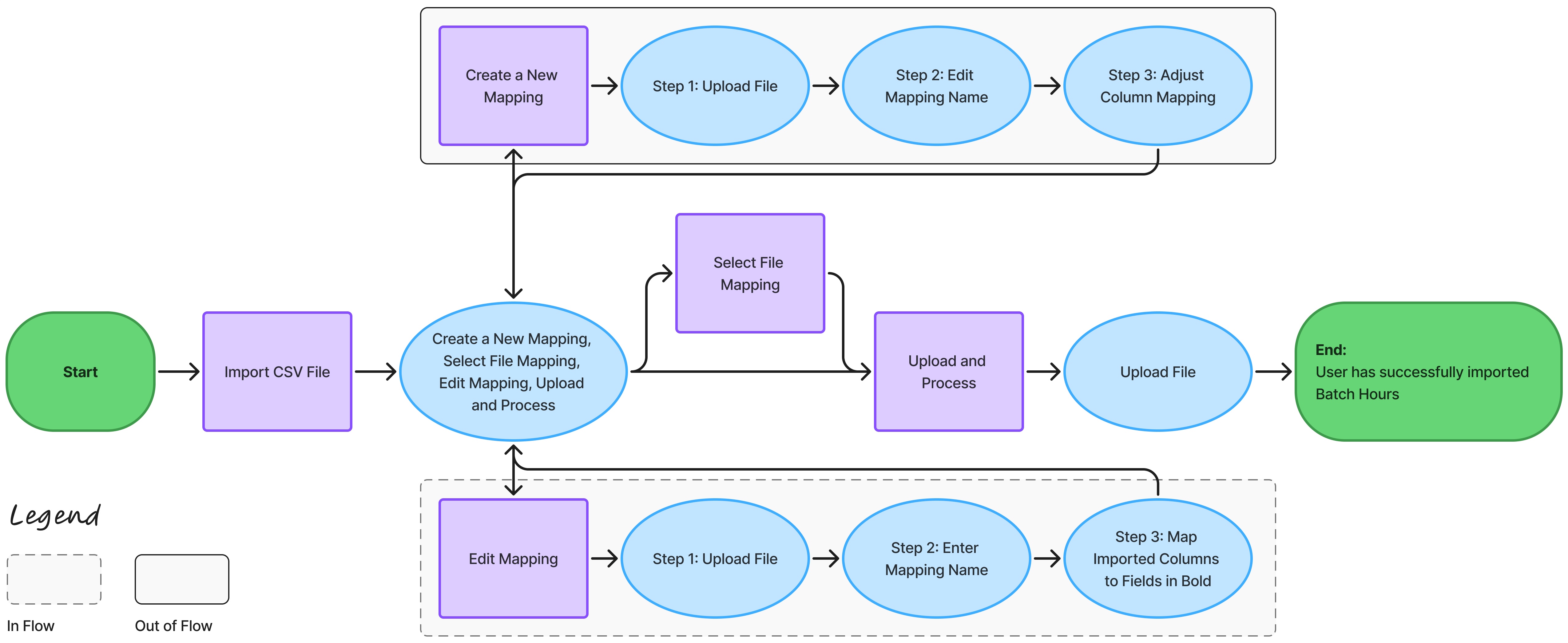
Existing Flow
Key Decisions — 01
The Stepper
Before
The internal reference point provided by the product team handled the import and mapping configuration in the same modal, but the path through it varied depending on what the user was trying to do. Creating a mapping, editing one, or running a routine import each followed a slightly different sequence of unlabeled steps, with file uploads happening at different points across the three paths. The flow was not broken, but it was not consistent or intuitive.
After
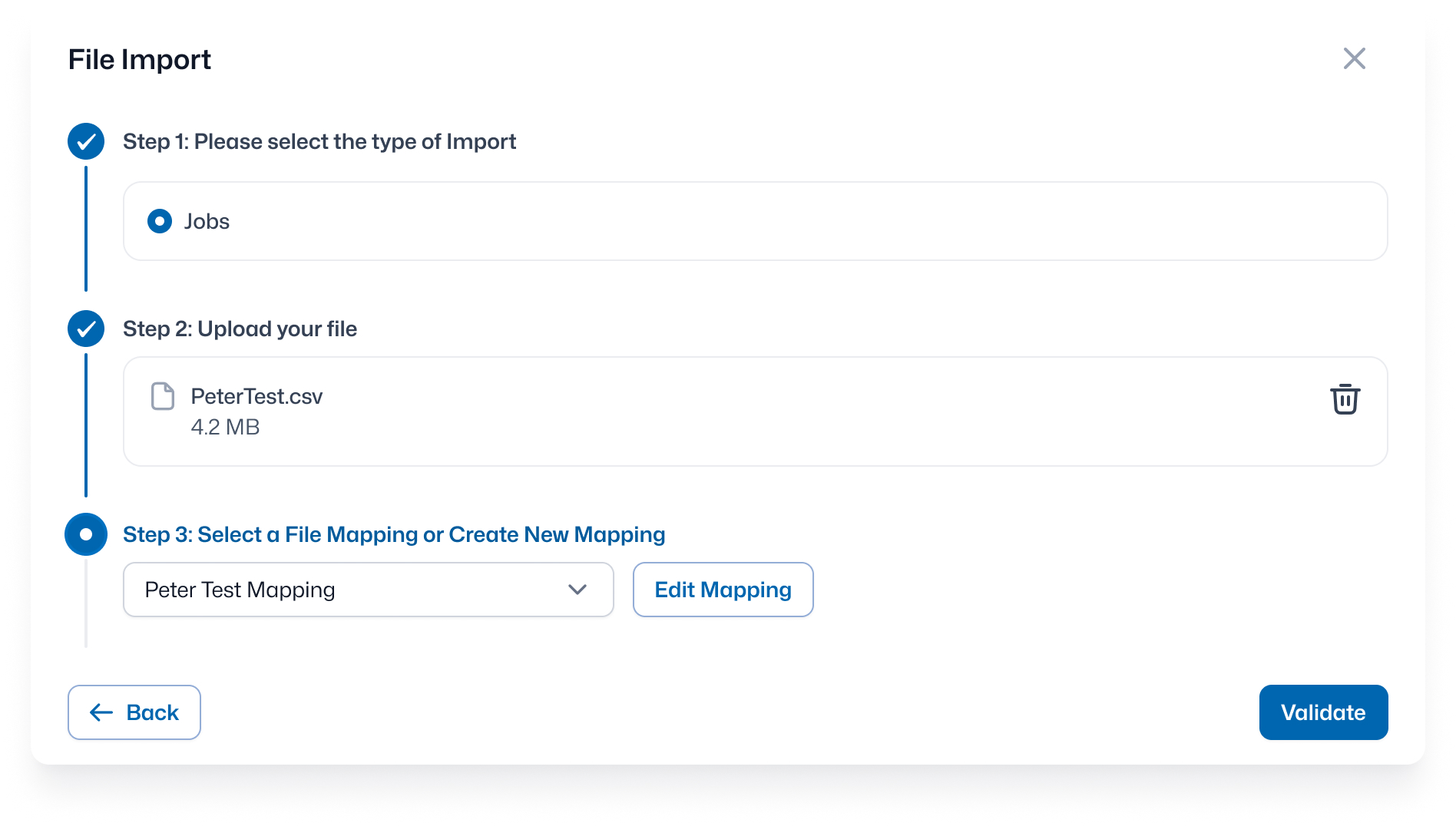
The new design makes every step explicit. The user selects their import type, uploads their file, then configures or selects a mapping, in that order. Placing the file upload before the mapping step makes the path consistent regardless of what the user needs to do next: create a new mapping, edit an existing one, or go straight to validation. Additionally, creating and editing a mapping now happens within the flow, so the user does not lose their place.
Key Decisions — 02
Column Mapping
Before
The mapping structure in the internal reference, a two-column layout where uploaded file columns are matched to system fields via dropdowns, worked and was carried over into the new design. What was missing was clarity around which fields actually mattered. Required fields were communicated through a notice on the right side of the table listing field names in a paragraph of text. This put the burden on the user to read it, retain it, and cross-reference it while working through each row.
After
In the new design, required fields are labeled directly in the dropdown. When a user opens the menu for any column, they can see which Bold fields are required alongside the others. The information is surfaced at the moment it is needed. The new design also introduces two new controls at the row level: a toggle to mark an imported column as required which flags any missing data cells during validation and an ignore option in the dropdown to tell the system to skip that column entirely during the validation process. These gave power users and the implementation team the ability to enforce their own data standards on top of the base requirements without any additional configuration.
Key Decisions — 03
Data Validation
Bold had no existing data validation patterns. Classic, the back-office counterpart, breaks errors out by type, removing all row context and forcing the user to cross-reference their file to understand what went wrong. We wanted to do the opposite. The validation screen still surfaces only the rows with errors, but now also preserves the full row so the user can see exactly where the problem is. A summary in the top right shows validated rows alongside errors remaining, giving the user a clear sense of scope before they dig in. When a user selects an error cell, a tooltip appears above it describing the specific issue. The user can correct it, remove the data if it is not required, or exclude the row entirely using the remove checkbox. When the user is ready, the back button is available if the user needs to edit or fix something.
New Flow

Takeaways
What I Learned
This was my first project with this level of back and forth between design, product, and engineering, and it was one of the most valuable experiences I have had as a designer. Early on I was considering some ambitious directions for the mapping interaction that, in hindsight, did not need to be so complex. After receiving feedback from the broader project team about feasibility, component constraints, and scope, I learned to work more collaboratively throughout my design process, rather than operating independently.
If I were starting over, I would invest more time upfront aligning with product and engineering on scope. This was a net-new feature, so requirements evolved throughout the process. The back and forth was productive, but a tighter foundation earlier on would have allowed the team and me to be more efficient.
Outcome
Results
Since launching, the feature has seen steady adoption across the customer base. One of the clearest signals came from one of our clients who has used the feature 525 times in the last 90 days, a volume that would have previously required either manual entry or an implementation request.
"The feature is very thoughtfully designed and I cannot think of anything else that is needed. This is way better than the functionality we had in the Classic application."
"Very flexible and easy to use feature and yet very robust."
Beyond customer adoption, the feature has meaningfully reduced the backlog for the implementation team, shifting data migration from an internal dependency to a self-serve workflow. A process that used to take days or weeks now takes minutes.